
Mastering Claude: The Org Age of AI
A practical guide to thinking about AI — from your first hands-on exercise to compound production systems.
TUTOR WITH THEFOCUS.AI
Copy this prompt into Claude, ChatGPT, or any external AI assistant. It points the assistant to the course instructions and links it to your student profile to track your progress and customize observations.
You are not enrolled yet. Enroll to generate a Student ID to track lesson completions and store learning notes.
Mastering Claude: The Org Age of AI
A hands-on guide to building intelligence into how your organization actually works.
10 chapters · 42 short lessons · 4 cumulative reviews · Will Schenk
Why This Course Exists
You don’t need a bigger model. You need a smarter operation.
Most AI advice starts with the technology. This starts with your work. The invoices you process, the reports you check every morning, the rules that live in one person’s head. The stuff a COO worries about — not what model to pick, but how to make the organization run better.
Every chapter gives you something to do right now. Open Claude, ask a real question, see where it breaks. Dictate your rules on your phone while walking through the warehouse. Build a working web tool for your team by describing it. Drop a spreadsheet into Cowork and watch it find errors you missed. Install a tool, connect your data, set up a schedule. By the end, you’ve built a system that categorizes transactions, processes invoices, flags anomalies, and improves every time you correct it.
The running example is Cornwall Market — a grocery store and bakery with fifteen suppliers, manual invoice processing, and categorization rules that live entirely in the owner’s head. If that sounds familiar, you’re in the right place. If your version is a law firm, a construction company, or a SaaS team — the pattern is identical. Undocumented knowledge, manual data entry, tribal expertise that doesn’t scale.
This is not a prompting guide. It’s a build guide. Each chapter is a set of short lessons — one milestone each, five to fifteen minutes, always with something to actually do — and connects what you build to everything you’ve already built. The pieces compound. That’s the whole point.
And you don’t have to walk it alone: every lesson page has a “Tutor with TheFocus.AI” prompt. Paste it into Claude and your own AI tutor works through the material with you — explaining one gate at a time (concept, then check, then hands-on), adapting the exercises to your actual work, and tracking your progress. Tutors follow /llms.txt so sessions stay interactive rather than dumping the whole lesson at once.
This course makes you construct answers, not just read. Every chapter ends with a Check Your Understanding bank — open-ended questions your tutor grades against explicit criteria (pass: 4 of 5), with fresh variants on retries. Each depth tier ends with a cumulative ten-question Review (pass: 9 of 10) that mixes topics deliberately. The research is unambiguous: completing constructed-response practice embedded in reading produces several times the learning of reading alone, and cumulative reviews with spaced retakes are the strongest predictor of retention. The questions are not a formality — they are the half of the course where the learning happens.
The Four Transitions
The path from tribal knowledge to compound systems
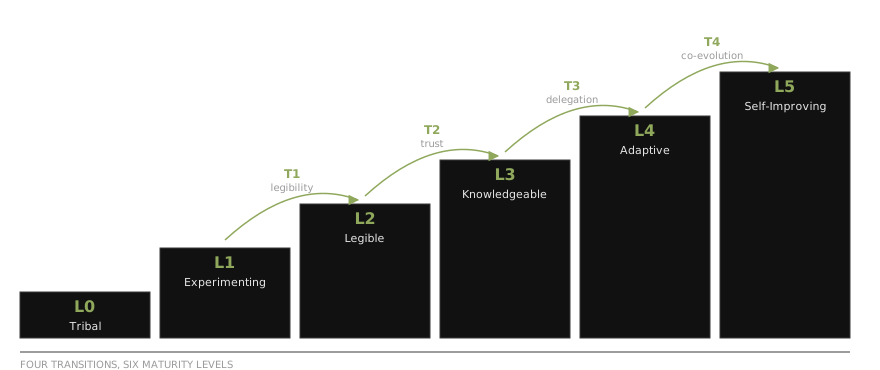
Four transitions. Each builds on the one before. The early ones are things anyone can try — describe how you work, connect your tools. The later ones get deeper. Start where you are.
Transition 1: Making the Org Legible. Can the company describe its own work to a machine? Chapters 01–04 · Voice capture, Artifacts, Projects, Skills · Audience: Everyone
Transition 2: Trusting Your Own Data. Can people act on what the system tells them? Chapter 05 · Connectors, Cowork, MCP · Audience: Teams
Transition 3: The System Starts Acting. Does the system surface insights before being asked? Chapters 06–08 · Remote Control, Dispatch, Channels, Computer Use · Audience: Integrators
Transition 4: The System Changes the Org. Does the system learn from its own operation? Chapters 09–10 · Habitats, Evals · Audience: Builders
The AI Maturity Framework
Most teams are at L0 or L1 — and that’s fine. This course starts there. The first four chapters are about making the jump to L2: describing your work in a way machines can follow. Everything else builds from that foundation.
| Level | Name | Your Organization… |
|---|---|---|
| L0 | Tribal | Runs on tacit knowledge and habit. Processes live in people’s heads. |
| L1 | Experimenting | Uses AI individually. Nothing shared, nothing compounding. |
| L2 | Legible | Can describe its own work to a machine. Tribal knowledge becomes shareable instructions. |
| L3 | Knowledgeable | Knows what it knows. Proprietary data is connected with verification infrastructure. |
| L4 | Adaptive | System surfaces insights before being asked. Delegation tools are in place. |
| L5 | Self-Improving | System learns from every interaction. Eval and feedback loops close the circle. |
How to Read This
Start accessible, go as deep as you want
Depth 1 — Foundations. Chapters 01–03. No code, no terminal, nothing to install beyond the Claude app. Learn the tool, capture knowledge by voice, build and share your first web tool. Exercises anyone can try today. Ends with the Foundations Review.
Depth 2 — Structure. Chapters 04–05. Give knowledge a permanent home — Projects and skills — and connect real data. Leaders and builders both benefit, from different angles. Ends with the Structure Review.
Depth 3 — Delegation. Chapters 06–08. The system acts on what it sees. Remote Control, cloud sessions, channels, routines, Computer Use. Real automation. Ends with the Delegation Review.
Depth 4 — Production. Chapters 09–10. Habitats, evals, compound systems. For teams building production agent infrastructure. Ends with the Production Review.
Chapter Listing
| Chapter | Title | Description | Level | Tools |
|---|---|---|---|---|
| 01 | The Org Age of AI | A guided tour, your first real question, and the map | L0 → L1 | Claude.ai |
| 02 | Claude in Your Pocket | Voice, camera, and the phone-to-laptop handoff | L0 → L1 | Claude mobile app, voice mode |
| 03 | Making Things with Artifacts | Turn a conversation into a working, shareable web page | L1 | Artifacts |
| 04 | Making Your Organization Legible | Projects, CLAUDE.md, and your first skill — no code required | L1 → L2 | Projects, SKILL.md |
| 05 | Trusting Your Own Data | Connectors, Cowork, and why MCP multiplies everything | L2 → L3 | Cowork, Connectors, MCP |
| 06 | Delegation, Not Prompting | The system starts acting on what it sees | L3 → L4 | Claude Code, Remote Control, cloud sessions |
| 07 | The Always-On System | Channels, routines, and the system that works while you sleep | L4 | MCP, Channels, Routines |
| 08 | When APIs Don’t Exist | Computer Use closes the last gap | L4 | Claude in Chrome, Computer Use |
| 09 | Running Agents in Production | Habitats, evals, and production agent infrastructure | L4 → L5 | Umwelten, Habitats |
| 10 | The Compound System | Everything multiplies — capabilities times access methods | L5 | Full stack |
The Concrete Build Map
| Chapter | Transition | What You Build | Cornwall Market Arc |
|---|---|---|---|
| 01 | Orientation | Your legibility gap list | Sarah discovers what Claude doesn’t know |
| 02 | Orientation | Voice capture, camera input, device handoff | Sarah dictates vendor rules walking the aisles |
| 03 | Orientation | A published artifact — a working web tool | The staff cheat-sheet goes on the register iPad |
| 04 | T1: Legibility | A Project, then your first SKILL.md | The dictated rules become structured, shareable knowledge |
| 05 | T2: Trust | Connectors and your MCP roadmap | Claude finds errors in Cornwall Market’s books |
| 06 | T3: Delegation | Remote Control, cloud sessions, Dispatch | Invoice processing moves from manual to agent-assisted |
| 07 | T3: Always-on | MCP connections, routines, channels | Daily invoice processing runs automatically |
| 08 | T3: Last mile | Computer Use for systems without APIs | Handling the vendor portal that only has a web interface |
| 09 | T4: Production | Agents with eval and feedback | The system learns from Sarah’s corrections |
| 10 | T4: Compound | The full system | All pieces working together, continuously improving |
The Distillation Pipeline
There is a second thread running through the course: the distillation pipeline. Every conversation you have with Claude is a potential source of organizational knowledge. The course follows a progression from the most informal capture to the most formal:
| Form | What It Is | Chapter |
|---|---|---|
| Conversation | You talk to Claude — typed, dictated, or interviewed — and explain how things work | Ch 01–02 |
| Project / CLAUDE.md | Knowledge pinned to a workspace so every session inherits it | Ch 04 |
| SKILL.md | Structured knowledge with rules, tables, exceptions | Ch 04 |
| MCP server | Knowledge exposed as tools any surface can call | Ch 07 |
| Habitat | Self-modifying agent that updates its own skills from corrections | Ch 09 |
The key insight: don’t just ask Claude to do things. Ask it to document how it did them so it can do them again. Every discovery gets documented back into the system. That is how a conversation becomes an agent.
The Claude Ecosystem
This course uses Claude’s ecosystem as the worked example. Three surfaces:
| Surface | What It Is | Best For | Used In |
|---|---|---|---|
| Claude.ai | Web and mobile chat interface with artifacts and analysis | Conversation, capture, artifacts, projects | Ch 01–04 |
| Cowork | The agent tab of the Claude Desktop app — sandboxed work on your actual files, browser via Chrome | Knowledge work, research, complex documents | Ch 05–08 |
| Claude Code | Terminal-native agent with full filesystem, shell, and tool access — also on the web, in IDEs, and in Slack | Development, deployment, production automation | Ch 06–10 |
Around them sits a wider family — Claude in Chrome, Claude Code on the web (claude.ai/code), Remote Control and Dispatch from your phone, Channels, Routines, and the Agent SDK. More doors into the same system, not more systems.
Connecting every surface is MCP — the Model Context Protocol, a standard that lets any tool, service, or data source expose itself to Claude through a single interface.
Who This Is For
Anyone trying to figure out what AI means for how they work. You don’t need to be a developer. You don’t need to be a CEO. The first three chapters are for everyone — hands-on exercises, no code, no terminal, nothing to install beyond the Claude app.
As the course progresses, the material gets more specialized: connecting data, building delegation, running production agents. Start wherever you are. If you’ve never used Claude seriously, start at Chapter 01. If you’re already capturing knowledge and making artifacts, jump to Chapter 04. If you’re integrating tools, go to Chapter 05. If you’re building compound systems, go to Chapter 09.
Based on real deployments at bookkeeping firms, construction companies, media analytics, financial services, and Tezlab. These aren’t hypothetical patterns.
01 the org age of ai
A five-minute tour of Claude, then a real question from your actual work.
The same question asked properly — attachments, constraints, and what 'good' looks like.
Why the middle layers get skipped, and how to name what Claude can't know about your work.
The roadmap for the course — maturity levels, transitions, and the Claude ecosystem.
02 claude in your pocket
Get Claude on your phone and find the three inputs that matter.
Dictate knowledge the way you'd train a new hire — the caveats are the knowledge.
Voice mode flips authoring into answering: have Claude interview you.
Paper, whiteboards, handwriting — photograph the physical world into structured data.
Capture on the phone, refine at the desk, use in the field.
03 making things with artifacts
Describe a tool and watch it appear — a working page, not a mockup.
Five rounds of feedback, real devices, real users, and a fearless undo.
Put the tool in your team's hands — and know what belongs on a public link.
04 making your org legible
Pin your knowledge to a workspace so every conversation inherits it.
Organizational opacity, CLAUDE.md, and the ladder of formality.
SKILL.md — structured, portable knowledge Claude loads automatically.
Plugins, credentials, and the new-hire test.
05 trusting your own data
Drop real data into Cowork and let the machine catch what you couldn't see.
Source attribution, audit trails, inspectable reasoning — what makes output trustable.
Drive, Gmail, Calendar — live-data answers with no terminal.
The connective tissue — and why one connection becomes five workflows.
Plan the first real connection before you build it.
06 delegation not prompting
The terminal agent — and the moment your skill becomes operational.
From operating a tool to steering an outcome.
Your phone as a window into the session running on your machine.
Work that survives your laptop closing — and the /teleport handoff.
07 the always on system
One command plugs in a live system — and Skills + MCP becomes compound capability.
Your knowledge becomes an API in thirty lines.
Stop checking things — events come to you.
The Monday-morning report that writes itself.
From alert to diagnosis, hands-free.
08 when apis dont exist
Claude drives a real browser — DevTools MCP for precision, Claude in Chrome for everyday.
API first, CLI second, browser third, screen last — and why.
If a human can click it, Claude can click it.
Dispatch GUI work from anywhere — with a human gate where it counts.
09 running agents in production
One command, fifty real examples, and the truth about which model works for YOUR task.
An agent is a git repo — config, skills, and memory, versioned.
Self-modifying agents, and how to verify a correction survived the night.
The same system runs both — and the loop that makes it better.
10 the compound system
Capabilities times access methods — count your workflows.
Four production patterns that use everything at once.
One workflow, end to end: trigger, data, knowledge, actions, feedback.
Where you started, where you are, and the progression that never changes.
✓ Reviews
Cumulative review of Chapters 01-03: the gap, capture, and making things.
Cumulative review of Chapters 04-05: projects, skills, data, and trust.
Cumulative review of Chapters 06-08: delegation, automation, and the last mile.
Cumulative review of Chapters 09-10: evals, habitats, and the compound system.