
The Handoff
Capture on the phone, refine at the desk, use in the field.
TUTOR WITH THEFOCUS.AI
Copy this prompt into Claude, ChatGPT, or any external AI assistant. It points the assistant to the course instructions and links it to your student profile to track your progress and customize observations.
You are not enrolled yet. Enroll to generate a Student ID to track lesson completions and store learning notes.
Start on the phone, finish at the desk
Now put the pieces together with the fact you verified in the first lesson of this chapter: every device is a window into the same account. That means work does not belong to a device — it travels.
The pattern that matters is capture on the phone, refine at the desk:
- Tuesday, 8:40am, walking the aisles — Sarah dictates the Pacific Foods splitting rules into her phone (the Talk, Don’t Type lesson). Claude structures them. She spots two things it got wrong but she is mid-inventory — she says “I’ll fix this later” and pockets the phone.
- Tuesday, 2pm, at her desk — she opens claude.ai in her browser, finds the same conversation in the sidebar, exactly where she left it. Now with a real keyboard and a big screen, she corrects the two rules, pastes in the account code list from her accountant’s email, and asks Claude to merge everything into one clean reference document.
- Wednesday, at the bank — waiting in line, she opens the app, pulls up the same conversation, and reads the final document one more time. She thinks of a missing exception (bakery delivery surcharges) and dictates it in.
Three sessions, three devices, one thread of work. Nothing was emailed to herself. Nothing was copy-pasted between apps. The conversation is the document’s home until it graduates to something more permanent in Chapter 04.
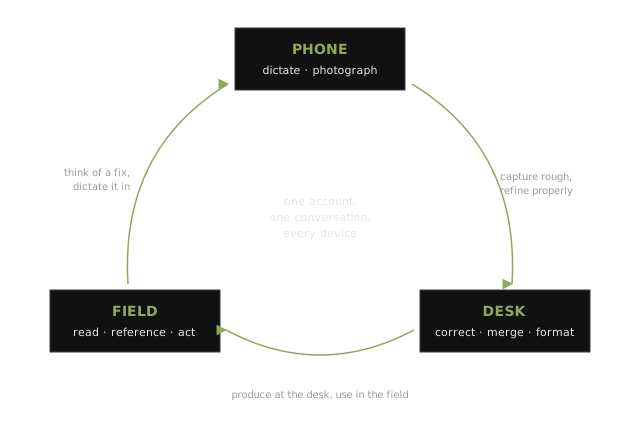
The handoff goes both directions, and each direction has its natural use:
| Direction | The Pattern | Examples |
|---|---|---|
| Phone → laptop | Capture rough, refine properly | Dictated rules, photographed documents, voice-interview transcripts — anything that needs editing, merging, or a big screen |
| Laptop → phone | Produce at the desk, use in the field | The reorder list you generated Friday, open on your phone at the supplier meeting; the long analysis you read while commuting |
Later in the course this same idea gets more powerful versions: in Chapter 06, your phone becomes a steering wheel for agents running on your laptop (Remote Control) and in the cloud (claude.ai/code sessions that survive your laptop closing, with /teleport to pull them down to your desk). The mental model is identical — the work lives in one place, and you touch it from wherever you are. You are learning it now with conversations because conversations are forgiving.
Do one full round-trip this week, on purpose:
1. Capture something on your phone — dictate a process, photograph a document, or run a voice interview.
2. Later, at your computer, open claude.ai, find that conversation, and finish the job: correct it, expand it, format it properly.
3. The next day, open the result on your phone somewhere away from your desk and actually use it.
The point is to feel the seam — or rather, to feel that there isn't one.
Your phone is now a capture device
Take stock of what you can do now that you could not at the start of this chapter:
- Dictate knowledge the way you would explain it to a new hire — and get a structured document back
- Be interviewed by Claude in voice mode, extracting expertise you did not know you had
- Photograph paper, handwriting, and the physical world into structured data
- Hand off work between devices — capture rough on the phone, refine at the desk, use in the field
Nothing in this chapter required a terminal, a subscription upgrade, or anyone’s permission. And yet this is the chapter where the course’s real work begins, because everything that follows runs on captured knowledge — and capture happens where work happens, which is mostly not at a desk.
You now have raw material: a dictated process document, a voice-interview summary, maybe a photographed invoice or two. In Chapter 03 you will learn to turn conversations into things — working web pages your team can actually use. In Chapter 04, your captured knowledge gets its permanent, structured home.
Check your understanding
Answer in your own words — write it down before opening the key. Your tutor grades against the criteria and generates fresh variants on retries.
Q1. Walk through a full phone-to-laptop-to-field round trip for one real task of yours: what you capture, what you refine, what you use — and name the property of the system that makes this work without emailing yourself anything.
Answer key — attempt every question first
Answer key
Q1
Model answer: Example shape: dictate the fix for a process on the shop floor (capture) → open the same conversation at the desk, merge with the existing doc, format properly (refine) → pull it up on the phone at tomorrow’s supplier meeting (use). The enabling property: the account is the workspace — every device is a window into the same conversations.
Pass criteria: three stages present with a real task; names account-level continuity (not a sync/email step) as the mechanism
Next: Your First Artifact