
The Tool Hierarchy
API first, CLI second, browser third, screen last — and why.
TUTOR WITH THEFOCUS.AI
Copy this prompt into Claude, ChatGPT, or any external AI assistant. It points the assistant to the course instructions and links it to your student profile to track your progress and customize observations.
You are not enrolled yet. Enroll to generate a Student ID to track lesson completions and store learning notes.
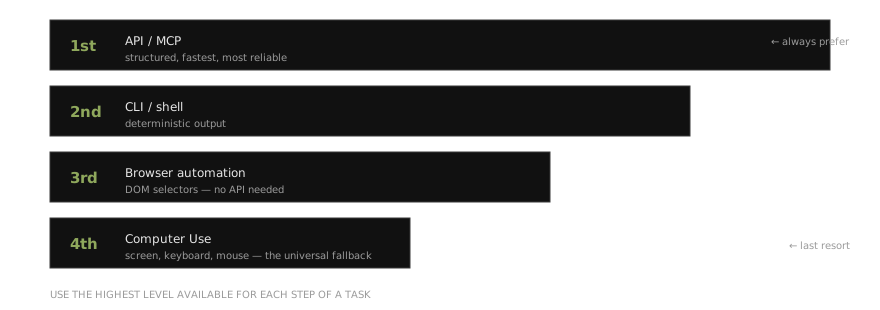
API first, CLI second, screen last
You have now used three levels of integration with Claude:
| Priority | Tool Type | What You Used | When to Use |
|---|---|---|---|
| 1st | API / MCP connectors | QuickBooks MCP (Ch 07) | Structured interface exists — fastest, most reliable |
| 2nd | CLI / shell commands | Claude Code built-in tools (Ch 06) | Command-line tool available — deterministic output |
| 3rd | Browser automation | Chrome DevTools MCP, Claude in Chrome (this chapter) | Web-based tool with no API |
| 4th | Computer Use | Coming next | No structured interface at all — GUI-only applications |
This hierarchy is not academic. It is experiential — you have used each level. The QuickBooks MCP connection from Chapter 07 is faster and more reliable than having Claude navigate the QuickBooks web interface. Chrome DevTools is faster and more reliable than Computer Use for browser tasks because it uses DOM selectors, not pixel-matching.
“Think of Computer Use as the universal fallback. The thing that makes the ‘we can’t automate that, there’s no API’ excuse disappear forever.”
Use the highest-level tool available. Computer Use is for the long tail — the applications that have no API, no CLI, and no browser-based programmatic interface.
Check your understanding
Answer in your own words — write it down before opening the key. Your tutor grades against the criteria and generates fresh variants on retries.
Q1. Recite the tool hierarchy in order and — the important part — explain WHY each level beats the one below it. What property degrades as you descend?
Answer key — attempt every question first
Answer key
Q1
Model answer: API/MCP first, CLI second, browser automation third, Computer Use (screen) last. Each descent trades structure for universality: APIs are typed and deterministic; CLIs are deterministic text; browser automation still has DOM selectors; the screen has only pixels. What degrades: structure — and with it speed and reliability.
Pass criteria: correct order; identifies structure/determinism (and speed/reliability) as the degrading property, not just ‘lower is worse’
Next: Computer Use